Did you know that AI agents have design patterns too?
When you build something with AI, you quickly notice a certain point. At first, you think, “I just need to write a good prompt.” But as requirements pile up, things get complicated fast. There are more conditions, exceptions to handle, and decisions about what to do when something fails.
That’s where patterns come in. Instead of forcing everything through one giant prompt, you divide responsibilities and organize the execution flow into a predictable, maintainable structure.
Why learn AI agent design patterns?
Prompts alone quickly reach their limits. Even something simple at first can develop requirements that need separate steps, rather than a single instruction to handle everything at once.
Inconsistent results are hard to use in production. If the same question gets a different answer every time, it’s difficult to put it into a service. A review loop such as “draft → check rules, tests, and evidence → revise” helps stabilize quality through structure.
Time and tokens are always limited. Running longer might seem more accurate, but running only the parts you need matters more. You can balance this by handling urgent work quickly, researching and organizing in parallel, and reviewing only at the end.
When something fails, you need to see where the problem is. One giant prompt often leaves you wondering what went wrong. Separate stages make it much easier to trace a problem to search, summarization, or verification.
It makes teamwork possible. Dividing roles into research, writing, and verification makes individual stages easier to improve. That structure can also be reused for the next task.
Real work requires checking. An agent can sound convincing, but we need to verify its claims against actual data: search results, databases, logs, or tests. Patterns are designed to include when to check with tools and what to use as a fallback when something fails.
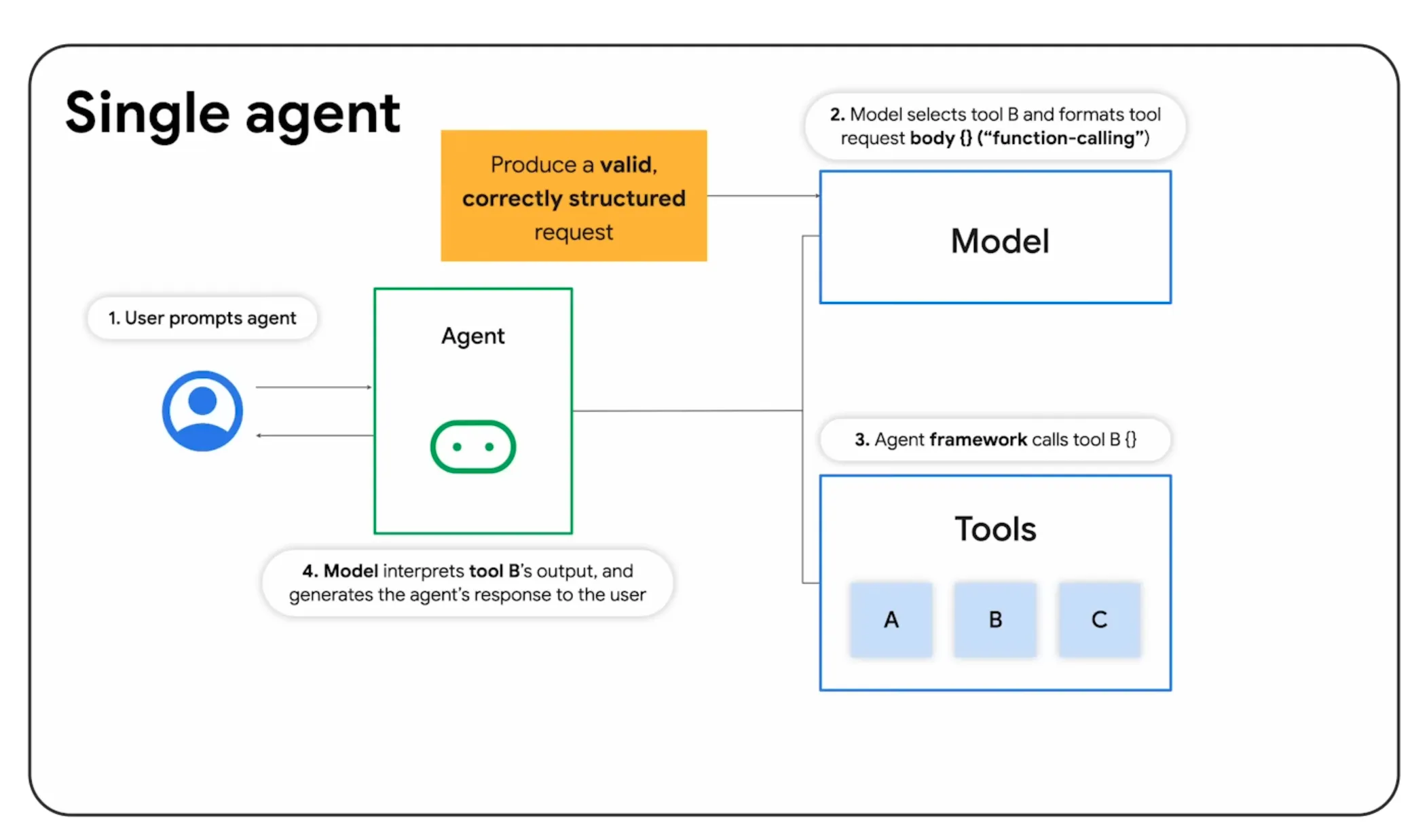
Pattern 1. Single agent
One agent handles everything from planning and tool calls to combining the results.
This generally fits situations like these:
- There is one goal, such as “Plan a trip to San Francisco.”
- Even a slightly mixed request can be completed in one pass: “Find a Japanese restaurant that’s open late and show me the fastest route there.”
The advantages are simple implementation and easy debugging. As requirements grow, though, the prompt gets bloated and quality becomes harder to control. This pattern often means starting small and considering another pattern as things grow.
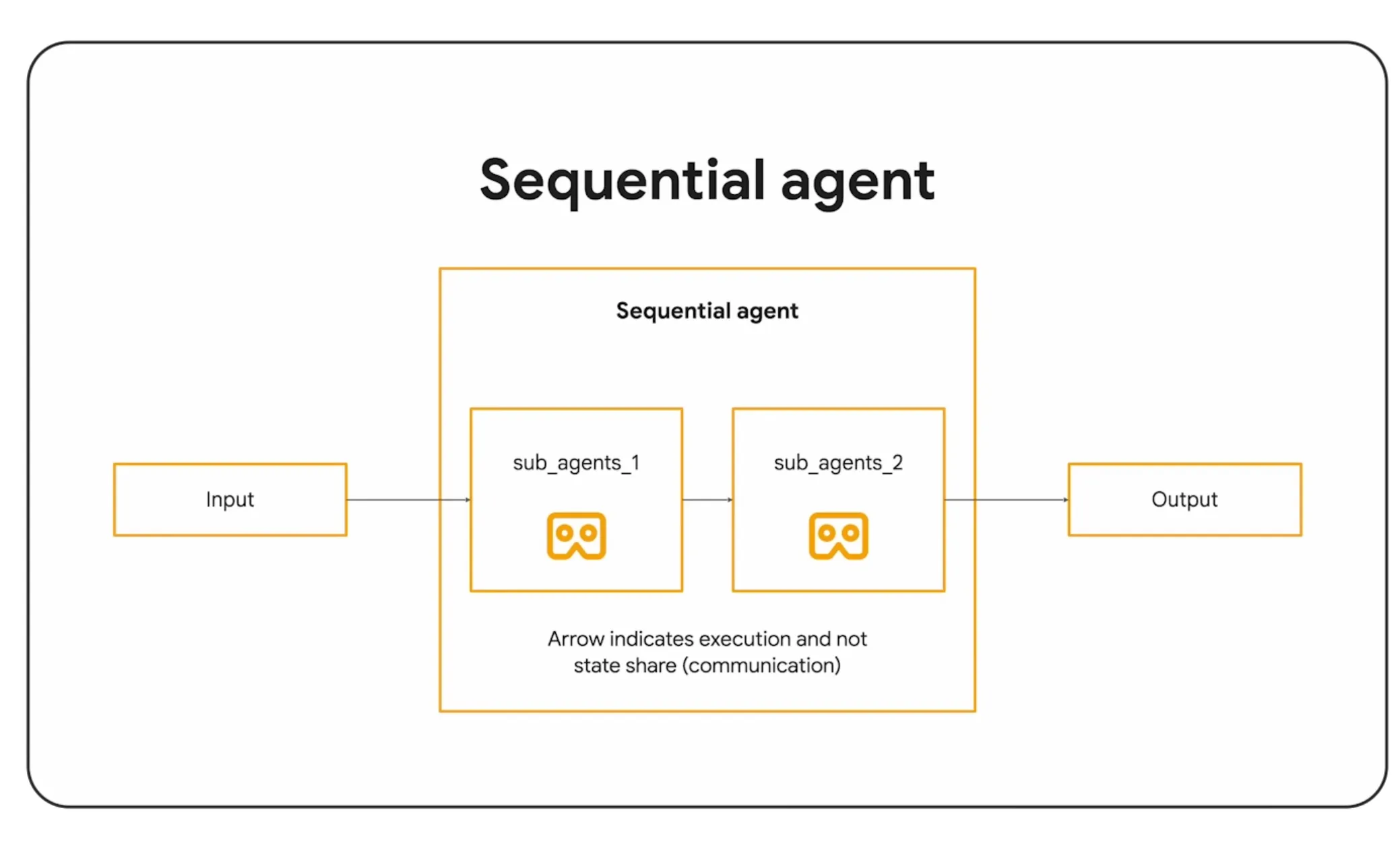
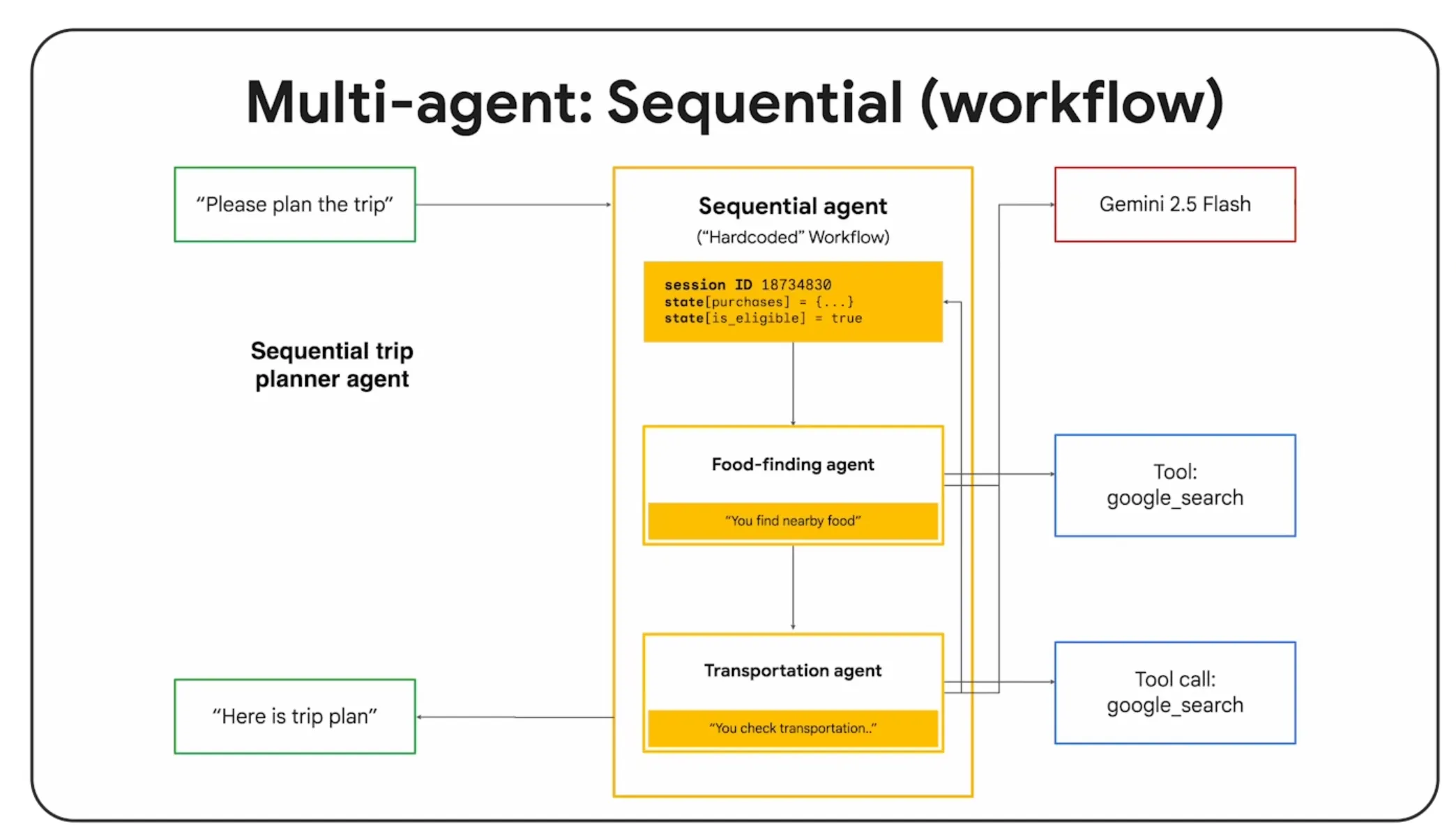
Pattern 2. Sequential agent (Pipeline)
Multiple subagents run in order. Think of it as a pipeline.
For example:
- Find restaurant candidates → calculate transportation and routes → produce a final summary and recommendation.
The clear flow makes results predictable and each stage easy to test and debug. Costs are also relatively easy to manage because you can keep and adjust only the stages you need.
The drawback is having to proceed in order. If the situation changes midway, skipping stages or replanning flexibly is difficult. Above all, longer pipelines accumulate latency.
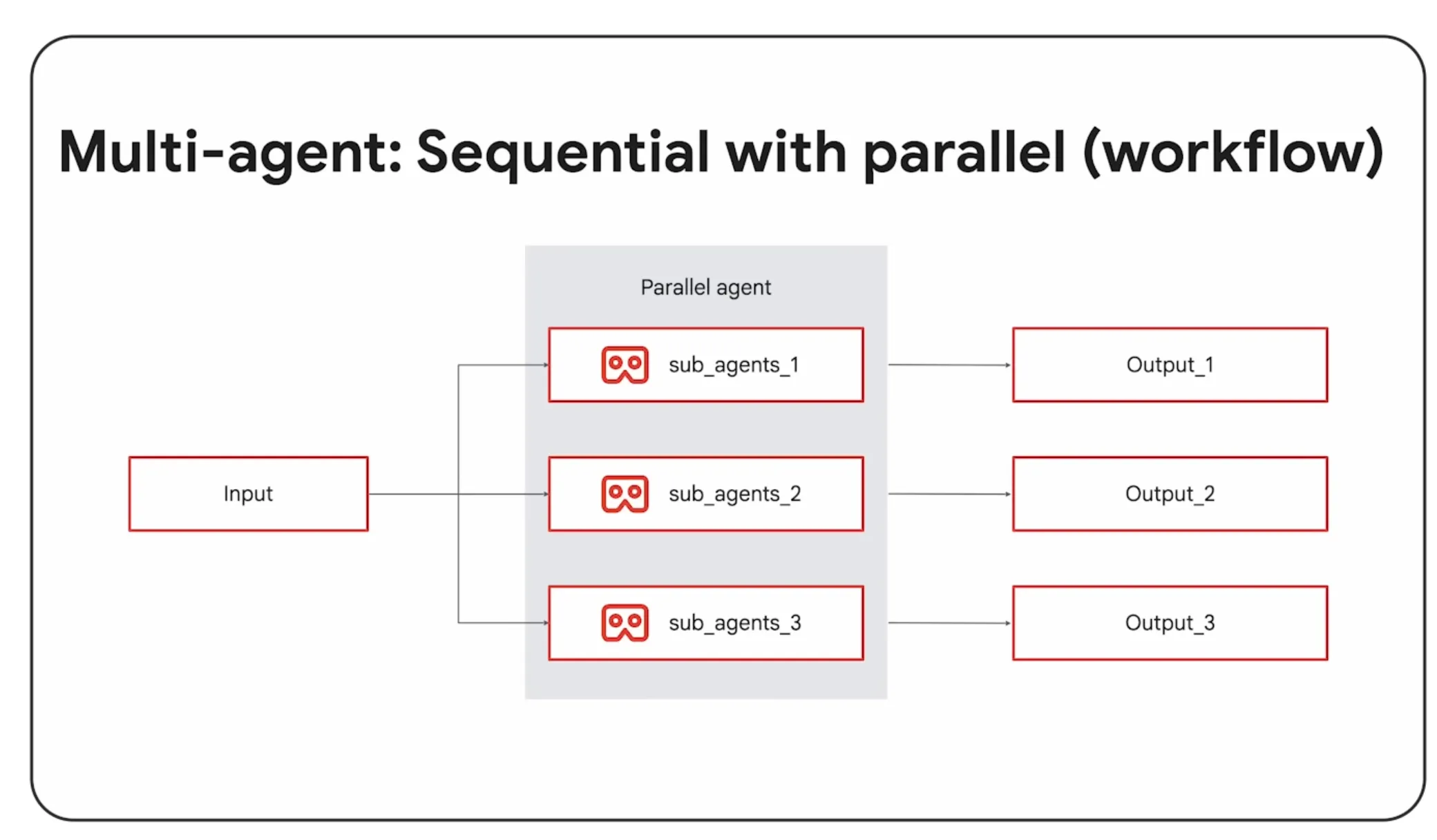
Pattern 3. Parallel agent
Independent tasks run simultaneously, and their results are combined.
For example, you could search for restaurant candidates and investigate transportation options and travel times at the same time, then create a recommendation.
The advantage is lower overall latency. You can improve speed while retaining some of the predictability of a sequential approach.
You do need to manage dependencies and state, and debugging can become difficult when results don’t line up. The more you run in parallel, the more details there are to watch.
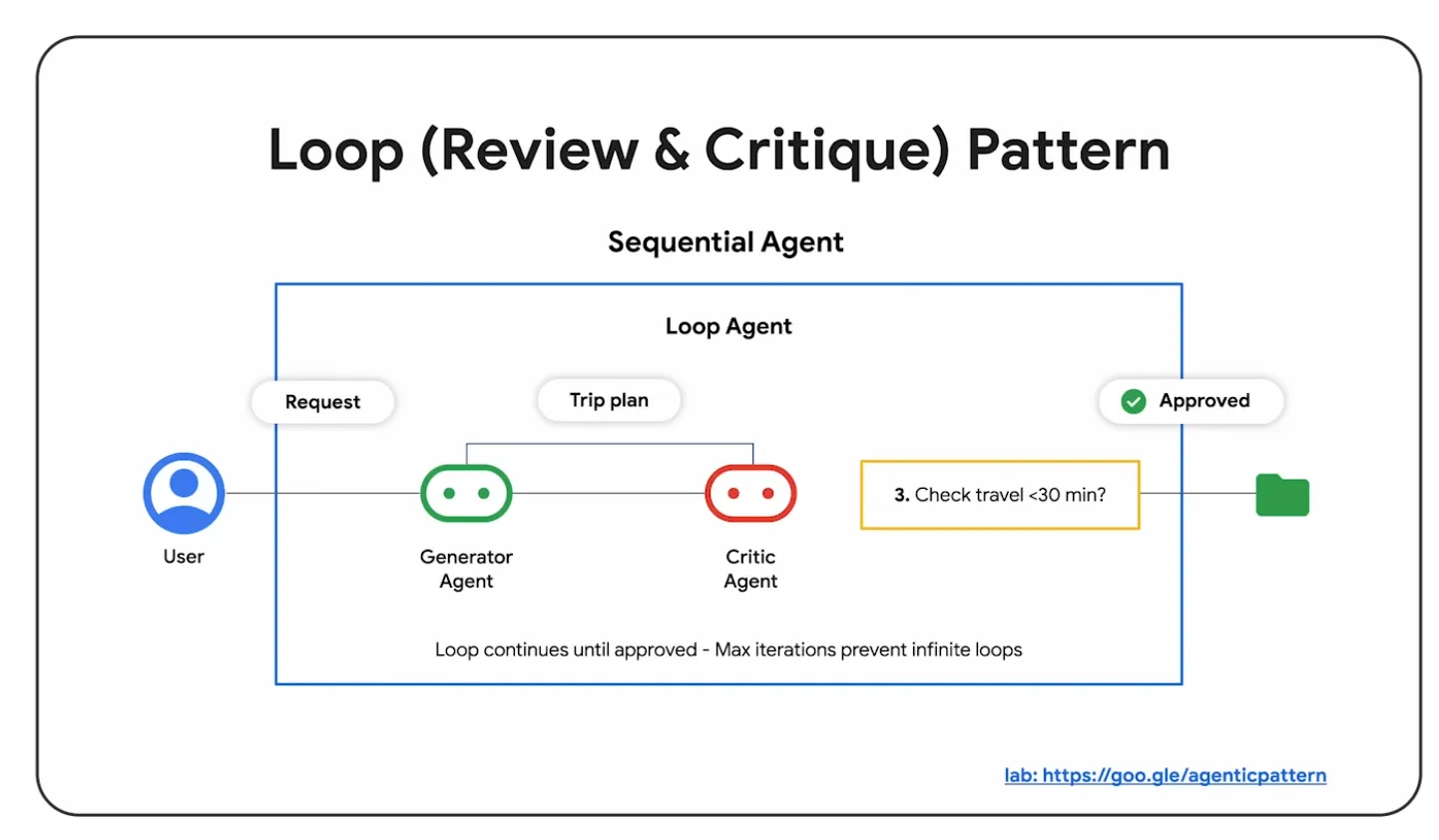
Pattern 4. Loop pattern (Review & Critique)
Instead of stopping after the first draft, you evaluate it, revise it, and try again. It’s literally a review loop.
For example:
- Generate a draft answer → validate it with rules or tests → regenerate or revise if it fails.
- Generate code → build and test → use error logs to keep making fixes.
This is useful for improving quality and accuracy beyond a single round of reasoning. It works especially well for coding, research, and organization tasks where the right answer may not appear on the first try.
The drawback is that each iteration can add time and cost. You need conditions to prevent infinite loops, and above all, carefully designed evaluation criteria.
Pattern 5. Coordinator (Router) pattern
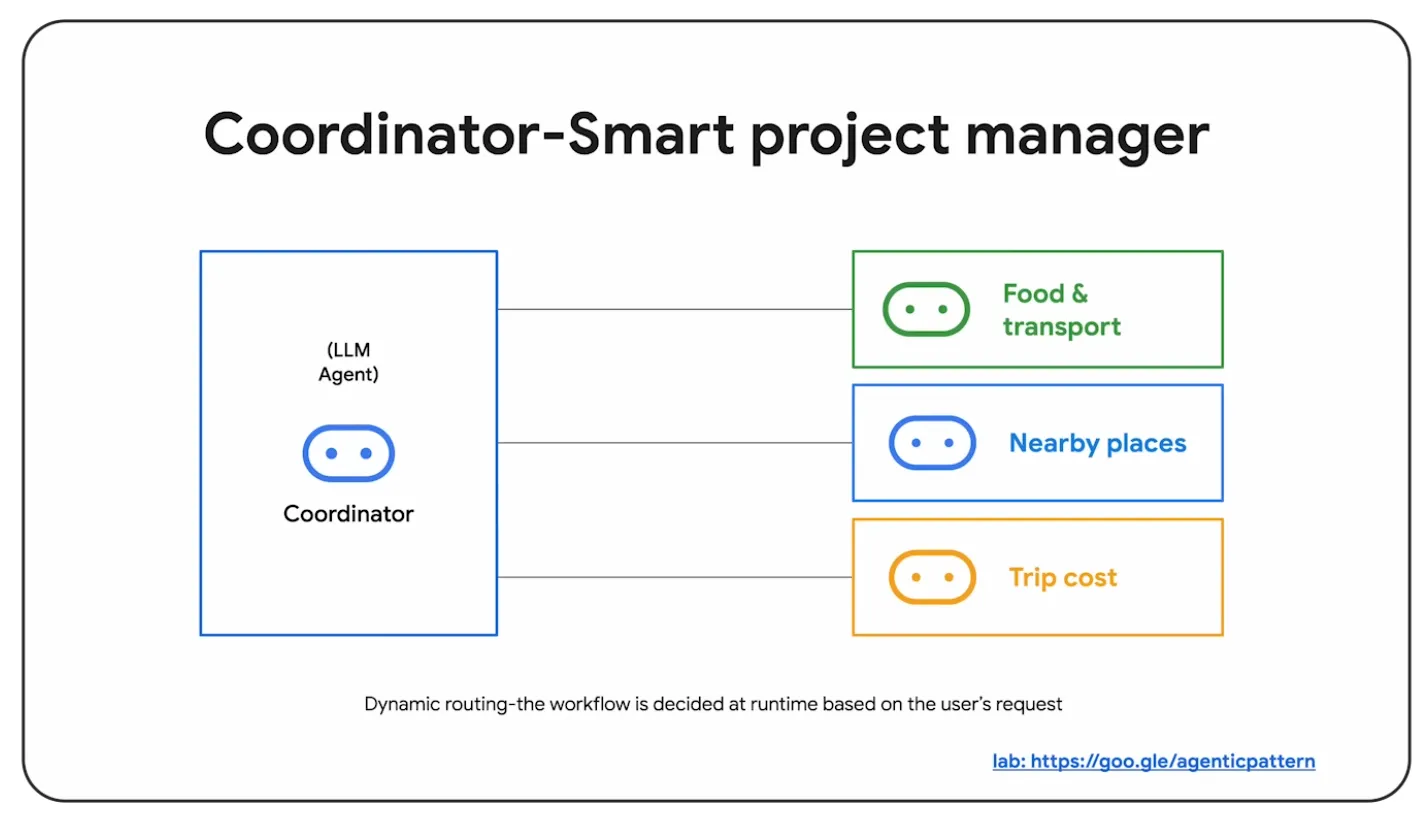
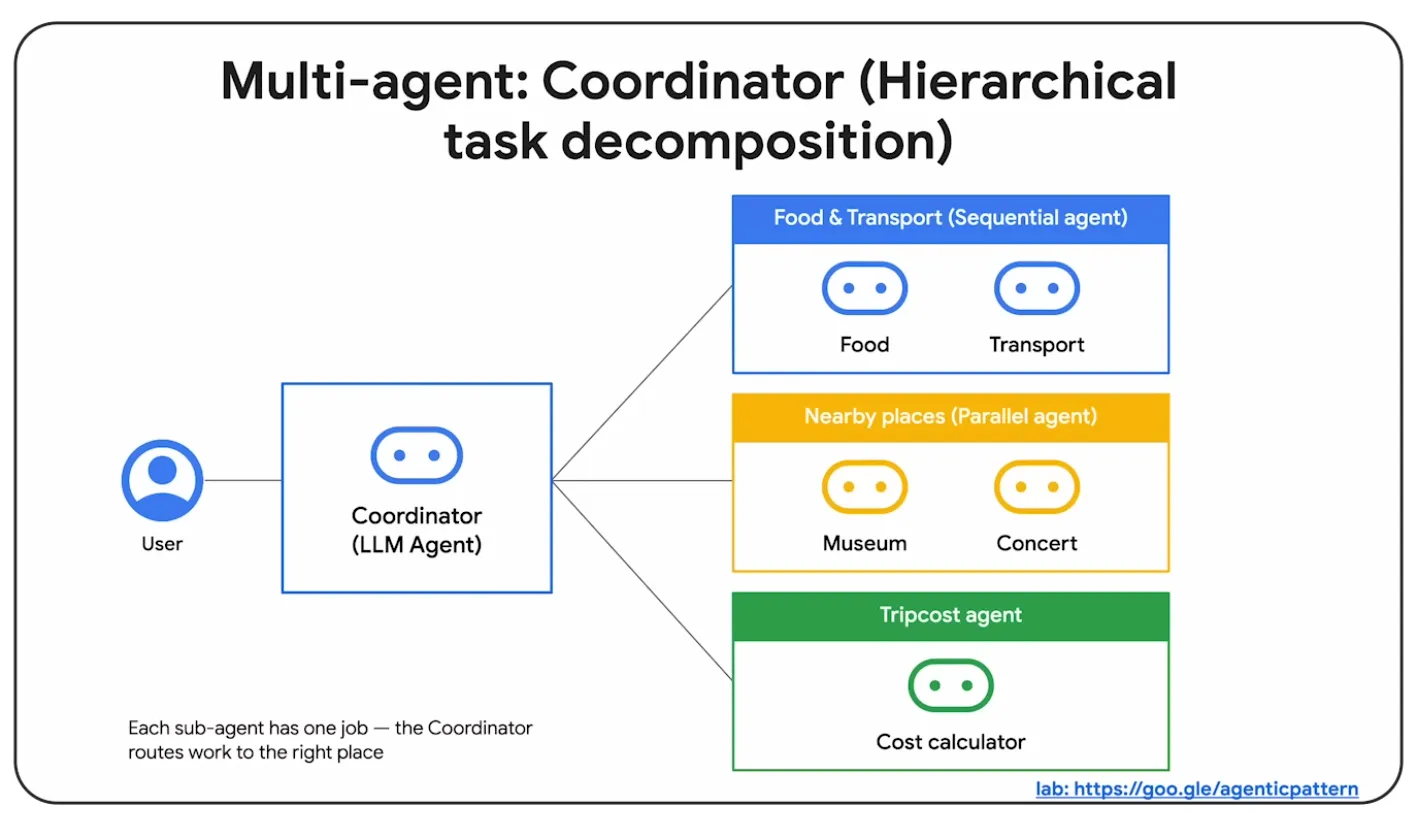
A higher-level supervising agent breaks down the goal, assigns work to subagents or teams, and gathers the results.
This is especially useful when a fixed pipeline won’t work—for example, when tasks are varied and the necessary stages differ from case to case.
Its advantage is scalability. Individual workers can stay smaller and more specialized, and routing can change dynamically with the situation.
On the other hand, the supervisor’s quality directly affects the quality of the whole system. Shared state and memory, conflicting results, and criteria for combining outputs all require design, which adds complexity. Extra calls for routing and combining results can also increase latency and cost.
Pattern 6. Agent as Tool
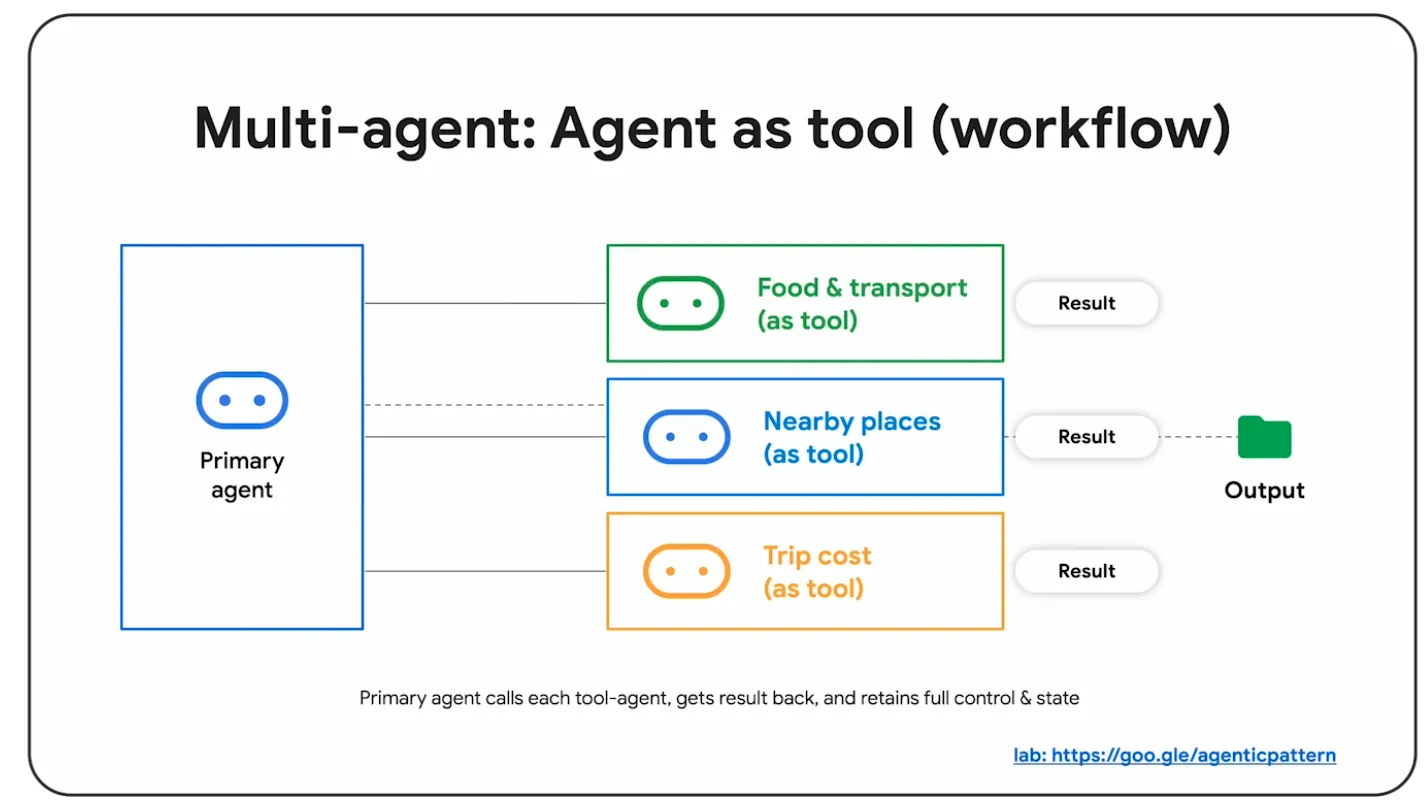
The LLM stays at the center, calling tools such as search, databases, and code execution when needed to interact with the real environment.
The key idea is that the model reasons and tools bring back facts. Better performance therefore requires combining reasoning with tool results.
You also need to design for tool failures, including permissions, retries, and fallbacks. In practice, I found this is where quality really differs.
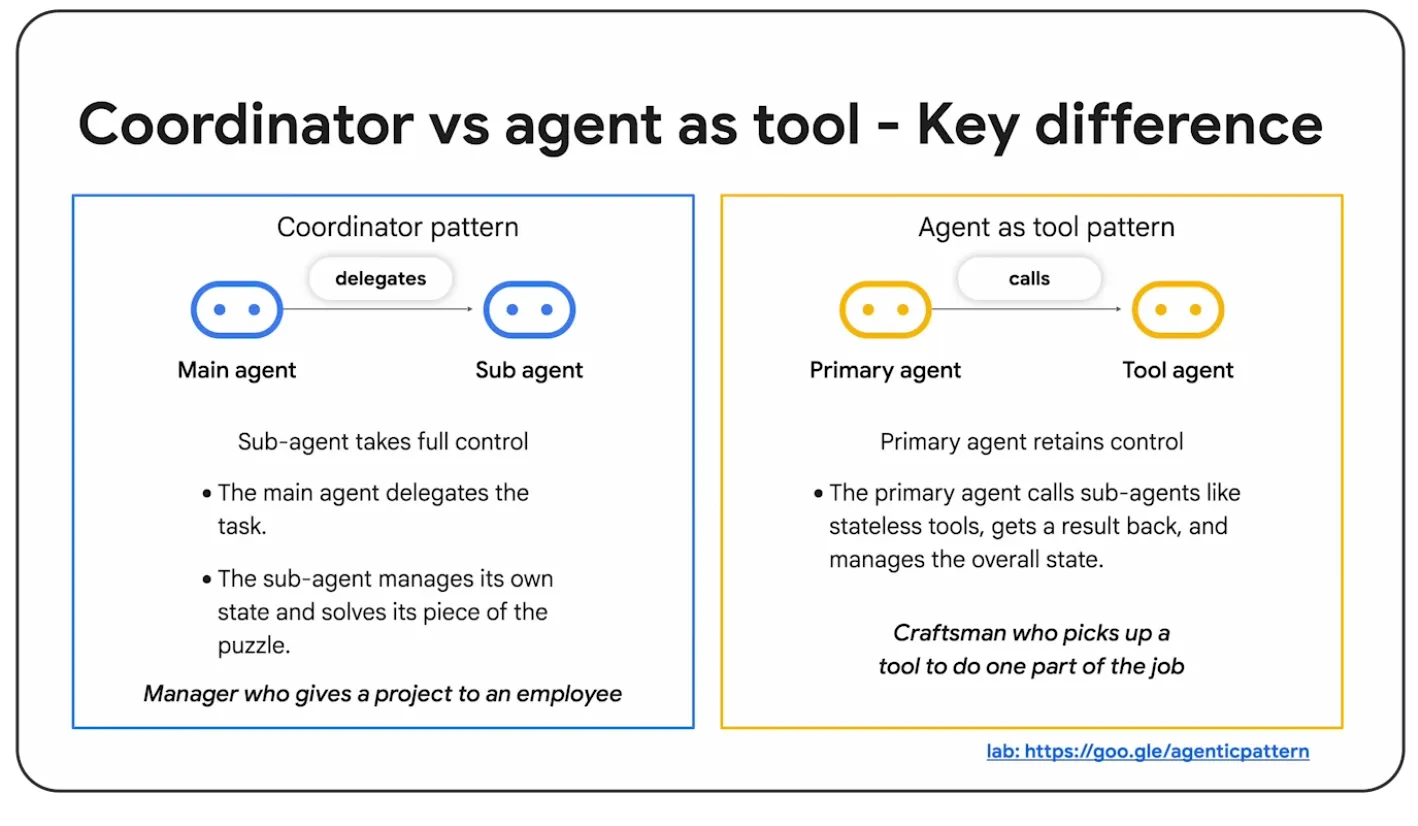
Pattern 5 vs 6: Coordinator(Router) vs Agent as Tool
Both move beyond one agent doing everything, but their focus differs.
Differences
- Pattern 5 (Coordinator/Router) centers on a supervisor that decides who should do what and coordinates and combines multiple results.
- Pattern 6 (Agent as Tool) centers on LLM reasoning, supplemented with the information returned by tool calls.
Design checkpoints
- In pattern 5, routing quality ultimately determines overall quality. You need to consider decomposition, assignment, shared state, resolving conflicting results, and criteria for combining them.
- In pattern 6, operational design for tool failures, permissions, retries, and fallbacks matters. You also need rules for trusting and interpreting tool results.
Using them together: a common combination in practice
Pattern 5 (supervision) and pattern 6 (tool calls) are often used together.
- For example, a coordinator assigns tasks to research, organization, and verification workers. The research worker calls search tools, and the verification worker calls testing tools.
Choosing a pattern
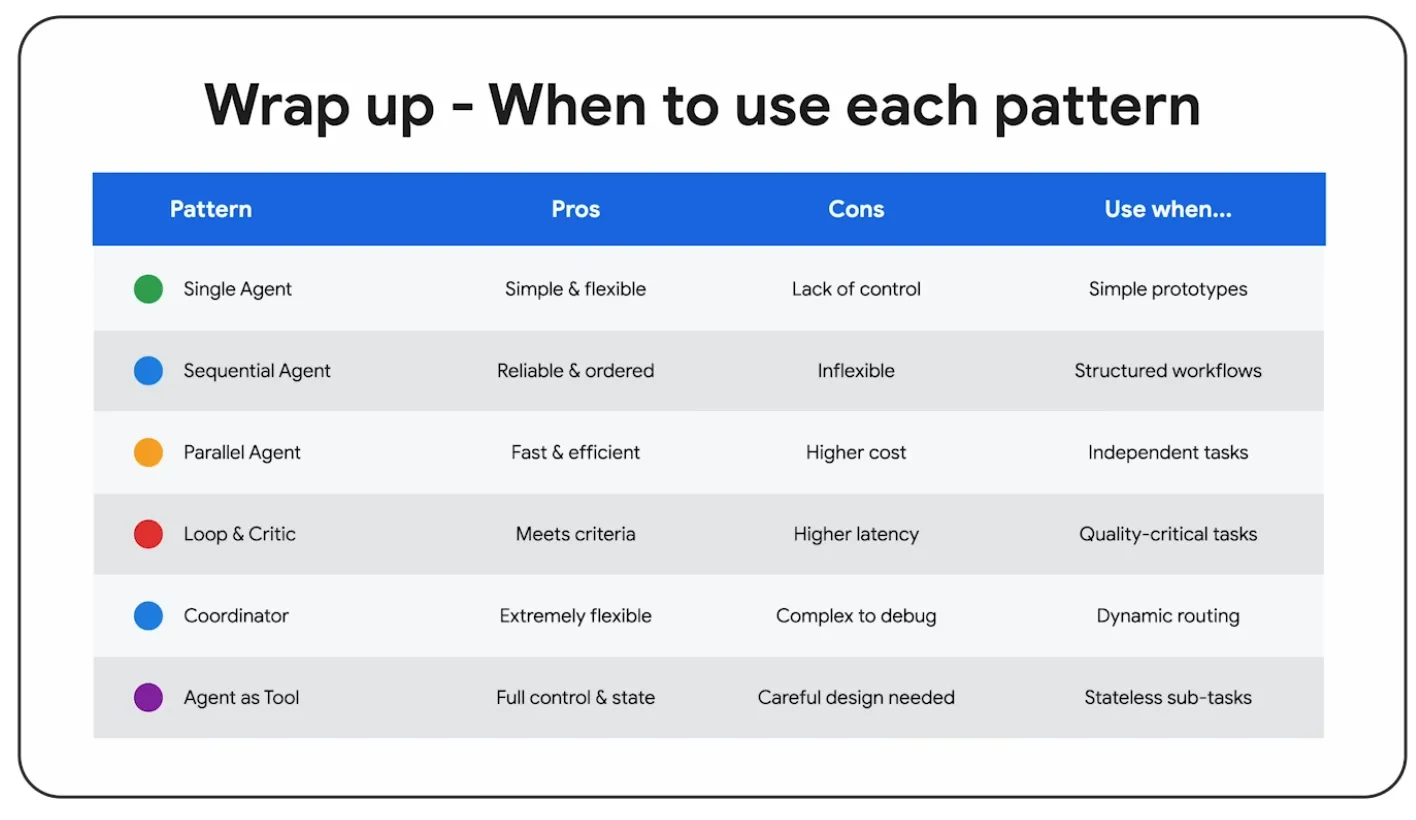
Here is a useful way to choose:
- A simple, short request → Single
- A business process with fixed stages, such as ETL or report generation → Sequential
- Independent research or calculations that should run simultaneously → Parallel
- Dynamic task decomposition and varied roles → Coordinator/Hierarchical
- Repeated verification to improve quality → Loop
References
- Video: AI agent design patterns (Google Cloud Tech): https://www.youtube.com/watch?v=GDm_uH6VxPY
- Agentic Pattern lab: https://goo.gle/agenticpatterndesign
- https://www.youtube.com/watch?v=89KKm_a4M7A
I organized the flow and wording of the source material to suit the tone of this blog.